Amazon Marketing Stream: Guide for Advertisers & Developers
Amazon Marketing Stream is a push-based messaging system that delivers hourly Amazon Ads campaign metrics and campaign-change messages directly into your AWS account. Instead of pulling a report at the end of the day and reacting to yesterday’s performance, you get near real-time visibility into what is happening right now.
Here is what that means in practice:
- Intraday action: hourly traffic and conversion data lets you adjust bids, reallocate budgets, and trigger alerts before a bad hour becomes a bad day.
- Push, not pull: Amazon sends data to your destination; you do not poll an endpoint.
- Ad product coverage: Sponsored Products, Sponsored Brands, Sponsored Display, and Amazon DSP are all supported.
- Infrastructure requirement: you need an active Amazon Ads API integration and an AWS account with either an Amazon Simple Queue Service (SQS) queue or an Amazon Data Firehose delivery stream configured as your destination.
If you are an advertiser who wants intraday campaign visibility, an agency building client dashboards, or a developer designing an automated bidding system, this guide covers everything from architecture choices to onboarding steps.
Table of Contents
- How Amazon Marketing Stream differs from standard Ads reporting
- What data you actually receive and how it’s structured
- Supported delivery destinations and recommended AWS architecture
- Who can use it and what access you need
- Primary use cases and the business benefits
- What a typical stream message looks like
- Known limitations and geographic availability
- Step-by-step onboarding to go live
- Developer best practices for reliable ingestion
- Case studies and real-world outcomes
- Key Takeaways
- The build-vs-buy question most teams get wrong
- What Selloop does with the data you just learned to collect
- Useful sources and further reading
How Amazon Marketing Stream differs from standard Ads reporting
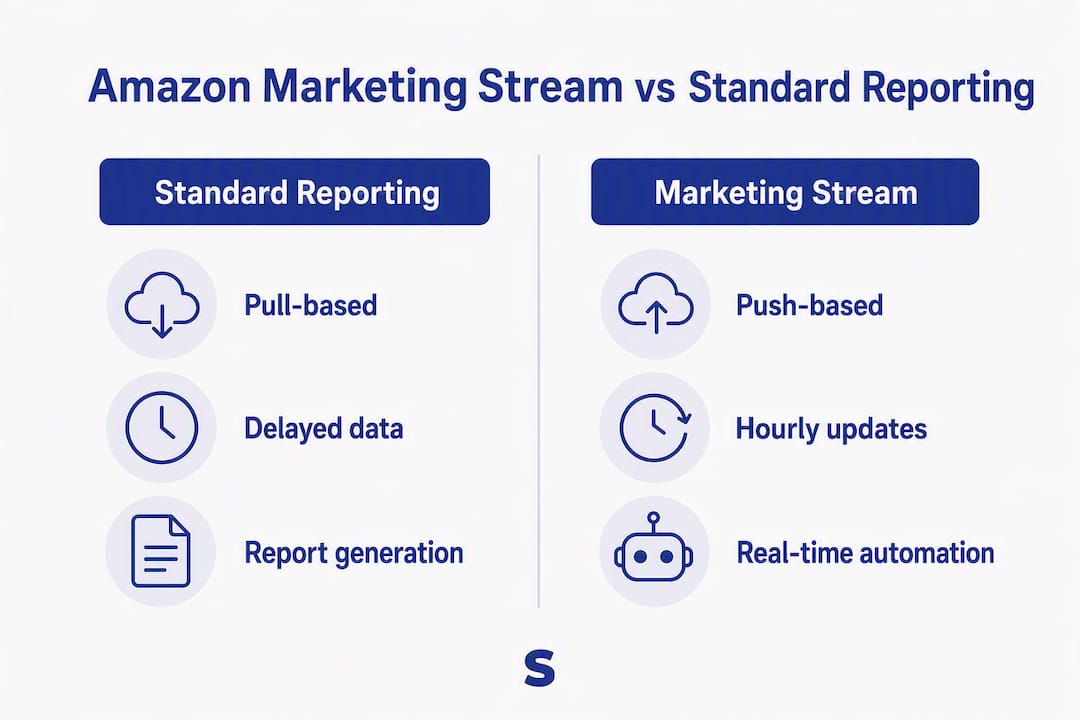
Standard Amazon Ads reporting is pull-based: you call an API endpoint, request a report, wait for it to generate, and download it. That cycle typically runs daily, which means your data is always hours old by the time you act on it.
Amazon Marketing Stream flips that model. Amazon pushes hourly summaries and campaign-state messages to your AWS destination as they become available. Reporting delays shrink from hours to minutes, and your system can react to a budget depletion or a conversion spike within the same hour it happens.
Two types of data arrive through the stream. Reporting datasets carry hourly traffic and conversion metrics: impressions, clicks, spend, and conversions broken out by campaign, ad group, and placement. Messaging datasets carry entity state changes: budget depletion notifications, eligibility changes, and bid updates. The distinction matters for how you design your consumers. Reporting data feeds dashboards and bidding models; messaging data feeds operational alerts and audit logs.

Stream is not a replacement for Amazon Marketing Cloud (AMC). AMC is built for long-term, privacy-safe attribution and cross-channel analysis. Stream is built for intraday action. Use them together: Stream for day-parting and budget pacing, AMC for multi-touch attribution and strategic planning.
Pro Tip: Design your receiving infrastructure as always-on from day one. A common mistake is building a poller-style consumer that wakes up on a schedule. Under a traffic spike, that architecture drops messages. Treat the stream as an asynchronous incoming workload and size your consumers accordingly.
What data you actually receive and how it’s structured
Stream delivers two categories of datasets, and knowing which is which saves you from designing the wrong schema.
Reporting datasets
These contain hourly aggregated metrics for each supported ad product. The table below maps dataset type to the fields you can expect.
| Dataset | Ad product | Key metric fields |
|---|---|---|
| SP reporting | Sponsored Products | impressions, clicks, spend, conversions, campaignId, adGroupId, keywordId |
| SB reporting | Sponsored Brands | impressions, clicks, spend, newToBrandOrders, campaignId, creativeId |
| SD reporting | Sponsored Display | impressions, clicks, spend, viewableImpressions, campaignId, adGroupId |
| DSP reporting | Amazon DSP | impressions, clicks, totalCost, purchases, lineItemId, orderId |
Every record includes a UTC timestamp marking the start of the hourly window, a datasetType field identifying the source, and entity identifiers you can join to your campaign hierarchy.
Messaging datasets
Messaging records carry operational signals rather than aggregated metrics. Common message types include:
- Budget depletion alerts: fired when a campaign’s daily budget is nearly exhausted.
- Eligibility changes: signals when a campaign, ad group, or ad transitions between eligible and ineligible states.
- Entity state changes: bid updates, status changes, and other mutations applied to campaign entities.
Each message includes an eventType field, a timestamp, the affected entity’s ID, and a payload describing the change. For automation use cases, eventType and budgetRemaining are the two fields you will query most.
Schema tip for warehousing: partition your S3 tables by year/month/day/hour using the message timestamp, not the ingestion time. Queries against intraday dashboards run significantly faster when the partition key matches the reporting window.
Supported delivery destinations and recommended AWS architecture
SQS and Amazon Data Firehose are both supported destinations, and the right choice depends on what you plan to do with the data downstream.

| Dimension | Amazon SQS | Amazon Data Firehose |
|---|---|---|
| Delivery model | Poll-based; your consumer pulls from the queue | Managed push to S3, Redshift, or OpenSearch |
| Latency | Near-real-time; messages available within seconds of delivery | Near-real-time; micro-batched before landing in S3 |
| Best for | Application consumers, automated bidding triggers, alerts | Analytics pipelines, Athena queries, QuickSight dashboards |
| Engineering overhead | Higher; you manage consumers, scaling, and visibility timeouts | Lower; AWS manages buffering, retries, and delivery |
| Message ordering | Not guaranteed by default (use FIFO queue for ordering) | Ordered within a shard |
| Durability | Configurable retention up to 14 days | Durable once in S3 |
When to choose SQS: you are building a real-time bidding engine or an alert system that needs to act on a message within seconds. Your application polls the queue, processes the message, and deletes it. You control the consumer logic entirely.
When to choose Firehose: you want the data in S3 with minimal plumbing. Firehose delivers directly into S3 and integrates natively with Athena and Amazon QuickSight, including Amazon Q for generative business intelligence queries. If your primary goal is analytics rather than millisecond automation, Firehose cuts weeks of engineering work.
A practical high-level architecture looks like this:
- Amazon pushes stream messages to your SQS queue or Firehose delivery stream.
- SQS consumers (Lambda functions or ECS tasks) process messages and write to a data lake in S3 or trigger downstream automation.
- Firehose lands data in S3, partitioned by hour; Athena queries the raw data; QuickSight visualizes it.
- A processing layer (Step Functions, EventBridge, or a custom service) routes messaging-dataset events to your alerting or bidding system.
Both destinations can run in parallel if you need both real-time automation and an analytics layer.
Who can use it and what access you need
Access requires an existing Amazon Ads API integration. There is no separate Stream credential. The three eligible account types are:
- Agencies managing advertiser accounts through the Ads API.
- Technology providers building tools on top of the Ads API.
- Direct advertisers (both vendors and sellers) with their own Ads API access.
What you need before you subscribe
- An active Amazon Ads API integration — with the
advertising::campaign_managementscope and working refresh tokens. There is no separate Stream credential. - An eligible advertiser profile — the profile ID you intend to subscribe, belonging to one of the three account types above.
- An AWS account — you provision the SQS queue or Firehose delivery stream here.
Practical onboarding checklist
- Verify your Ads API application has the
advertising::campaign_managementscope and active tokens. - Create your SQS queue (standard or FIFO) or Firehose delivery stream in your AWS account.
- Attach the IAM resource policy granting Amazon’s service principal
sqs:SendMessageorfirehose:PutRecordpermissions. - Test the IAM trust with a dry-run before calling the subscription API.
- Start with a non-production advertiser account to validate message format and volume before enabling production accounts.
- Subscribe to one dataset at a time during initial validation to isolate issues.
Primary use cases and the business benefits
That shift from reactive to proactive is where the real business value sits. Here is how different teams use it:
Intraday bid automation: a bidding engine subscribes to hourly SP reporting data, calculates a rolling conversion rate for each keyword, and adjusts bids up or down before the next hour. Campaigns running time-sensitive promotions (flash sales, Prime Day) benefit most because a two-hour delay in bid response can mean significant wasted spend.
Budget pacing alerts: messaging datasets fire a notification when a campaign’s budget is nearly depleted. An agency can route that event to a Slack alert or an automated budget top-up rule, preventing campaigns from going dark mid-afternoon on a high-traffic day.
Client reporting dashboards: agencies use Firehose plus Athena to power near-real-time dashboards that update hourly instead of daily. Clients see performance as it develops rather than in a morning summary email.
Operational audit trails: every entity state change is logged with a timestamp and entity ID. That creates a searchable record of every bid change, status flip, and budget edit, which is useful for debugging performance anomalies and for compliance reporting.
Advertisers running time-sensitive promotions gain the most from intraday data. Agencies with client SLA commitments benefit from the reporting speed. Developers building automated systems get a reliable event stream to trigger actions without polling.
What a typical stream message looks like
A Sponsored Products hourly reporting message arrives as a JSON object. A compact example:
{
  "datasetType": "SP_TRAFFIC",
  "timestamp": "2026-03-12T14:00:00Z",
  "campaignId": "123456789",
  "adGroupId": "987654321",
  "keywordId": "555000111",
  "impressions": 4820,
  "clicks": 93,
  "spend": 47.62,
  "purchases": 11,
  "eventType": "HOURLY_SUMMARY"
}
Key fields to note:
timestampmarks the start of the hourly window in UTC. Always parse it as UTC before converting to local time for day-parting logic.datasetTypetells your router which schema to apply. Build a schema registry keyed on this field so you can add new dataset types without redeploying parsers.eventTypedistinguishes hourly summaries from messaging events. A value ofBUDGET_DEPLETEDorELIGIBILITY_CHANGEroutes to your alerting path, not your metrics aggregator.- Null fields are common for metrics that do not apply to a given ad type. Always null-check before arithmetic.
For messaging records, the payload structure differs. A budget depletion message includes budgetRemaining, campaignId, portfolioId, and the eventType string. Your automation layer should key on eventType first, then extract the relevant payload fields.
For S3 partitioning: write files to s3://your-bucket/stream/dataset=SP_TRAFFIC/year=2026/month=03/day=12/hour=14/. Athena’s partition projection can then scan only the hours you need for a given query, keeping costs low as data volume grows.
Known limitations and geographic availability
Stream is powerful, but it has real constraints worth knowing before you architect around it.
Coverage gaps: Stream currently supports Sponsored Products, Sponsored Brands, Sponsored Display, and Amazon DSP. Not every Amazon Ads product or report type is available as a stream dataset. Check the official API reference for the current dataset catalog before designing your schema.
Not a replacement for historical reporting: Stream is optimized for intraday action. For long-term attribution, cross-channel analysis, or aggregated historical reporting, use AMC and the standard Ads reporting APIs alongside Stream. Treating Stream as your single source of truth for monthly or quarterly performance will produce gaps.
Message volume and quotas: high-volume advertisers with large campaign portfolios generate substantial message throughput. Size your SQS consumers or Firehose buffer settings to handle peak hours (typically early afternoon in the advertiser’s primary market) without message backlog.
Geographic availability: Amazon has expanded Stream availability across major markets, but coverage for specific ad products or dataset types can vary by marketplace. Verify availability for your target marketplace in the official documentation before committing to an architecture.
Ordering is not guaranteed with standard SQS queues. If your use case requires strict event ordering (for example, tracking a sequence of bid changes), use a FIFO queue or implement sequence-number checks in your processing layer.
Step-by-step onboarding to go live
- Confirm API access — check that your Ads API application carries the
advertising::campaign_managementscope and that your refresh tokens are live. - Provision your AWS destination — create an SQS queue or a Firehose delivery stream in the AWS region closest to your processing infrastructure.
- Attach the IAM resource policy — grant Amazon's service principal
sqs:SendMessageorfirehose:PutRecordon that destination. - Dry-run the trust — verify the IAM permissions resolve before you call the subscription API. A silent permissions failure looks identical to "no data yet".
- Subscribe to one dataset — start with a single dataset on a non-production advertiser account so you can read the message format without volume in the way.
- Validate, then expand — confirm schema and hourly volume against expectations, then enable the remaining datasets and your production profiles.
Developer best practices for reliable ingestion
The most common production failure is a consumer that works fine in testing and collapses under real traffic. These practices prevent that.
Pro Tip: Never build a polling loop that sleeps between calls. Under a message burst, a sleeping consumer falls behind and never catches up. Use Lambda event-source mapping for SQS or Firehose’s built-in buffering instead. Let AWS manage the concurrency scaling.
Buffering and resilient design:
- Use SQS or Firehose as your primary buffer. Never write directly from the Amazon push to your database without a queue in between.
- Set SQS visibility timeout to at least twice your expected processing time. If a consumer crashes mid-processing, the message becomes visible again rather than disappearing.
- Use S3 as durable intermediate storage for Firehose. Even if your Athena queries fail, the raw data is safe.
Idempotency and deduplication:
- Store processed message IDs in a fast key-value store (DynamoDB works well). Before processing any message, check whether its ID has already been handled.
- For hourly reporting records, use a composite key of
campaignId + datasetType + timestampas your idempotency key. Two deliveries of the same hourly summary should produce one row in your warehouse, not two.
Error handling and schema evolution:
- Route malformed messages to a dead-letter queue (DLQ) immediately. Do not let one bad payload block your main processing path.
- Build your parsers to be backward-compatible. Amazon may add new fields to existing dataset types. A parser that throws on unknown fields will break when the schema evolves. Use a permissive JSON parser and log unknown fields rather than failing.
- Implement exponential backoff on downstream write failures. A spike in S3 throttling should not cascade into message loss.
Testing:
- Unit-test your parsers against sample payloads for every dataset type, including edge cases (null fields, zero-value metrics, unknown
eventTypevalues). - Load-test your consumer with synthetic bursts before enabling high-volume production accounts.
- Track processing lag (the delta between message timestamp and processing completion time) as a key operational metric. If lag grows, your consumer is undersized.
Case studies and real-world outcomes
Amazon’s documentation cites SellerSpace as a concrete example of what hourly data enables in practice. SellerSpace, a technology provider integrated with the Ads API, used Amazon Marketing Stream to build intraday optimization workflows for its advertiser clients. The reported outcomes included improved conversion rates and lower ACOS, driven by bid adjustments and budget reallocation triggered by hourly performance signals rather than end-of-day reports.
The tactical pattern across Amazon-cited cases is consistent: use hourly SP and SB reporting data to identify which campaigns are converting above their target ACOS in a given hour, increase bids or budgets for those campaigns, and pull back on campaigns that are spending without converting. Time-of-day strategies, where bids are higher during peak shopping hours and lower overnight, are a direct application of this data. Budget reallocation, moving daily budget from underperforming campaigns to overperforming ones mid-day, is another. Both require hourly data to execute with any precision.
For agencies, the operational benefit extends beyond performance: near-real-time dashboards built on Stream data let account managers spot a campaign going dark at 2 PM rather than discovering it in the next morning’s report.
Key Takeaways
Amazon Marketing Stream delivers push-based hourly metrics and campaign messages to your AWS account, enabling intraday bid automation, budget alerts, and near-real-time reporting that daily API pulls cannot match.
| Point | Details |
|---|---|
| Push architecture, hourly cadence | Stream sends data to your SQS or Firehose destination; no polling required, and data arrives within the hour it covers. |
| SQS vs Firehose choice | Use SQS for application-level consumers and real-time triggers; use Firehose for managed S3 delivery and Athena/QuickSight analytics. |
| Access requires Ads API | Agencies, tech providers, and direct advertisers with existing Ads API tokens can subscribe; no separate Stream credential is needed. |
| Combine Stream with AMC | Use Stream for intraday actions and Amazon Marketing Cloud for long-term attribution; neither replaces the other. |
| Selloop for managed optimization | Selloop consumes campaign performance data, automates bid and keyword recommendations, and tracks every change over a 21-day results window, no custom AWS pipeline required. |
The build-vs-buy question most teams get wrong
Most teams frame the build-vs-buy decision around cost. That is the wrong frame. The real question is whether your team can maintain a resilient, always-on ingestion stack while also doing the actual advertising work.
Building a production-grade Stream integration is not a weekend project. You need idempotent consumers, dead-letter queues, schema-version handling, CloudWatch monitoring, and a backfill strategy for outages. For an engineering team at a large agency or a well-funded brand doing significant ad volume, that investment pays off because you get custom automation, tight latency SLAs, and full control over your data model.
For everyone else, the math rarely works. A small or mid-size seller spending a few thousand dollars a month on ads does not need a custom Firehose pipeline. The engineering overhead is disproportionate to the volume, and the opportunity cost is real: every hour spent debugging a DLQ is an hour not spent on creative, pricing, or inventory. Managed SaaS tools that already consume stream-like data and surface the resulting recommendations are a faster path to the same outcome.
There is one nuance worth flagging even for buyers: not all managed tools handle Stream data with the same rigor. Before committing to any vendor, ask specifically whether they support idempotent processing, how they handle backfills after an outage, and whether they track the results of changes over a meaningful window (21 days is a reasonable minimum to distinguish signal from noise). A tool that fires recommendations but never shows you whether they worked is not an optimization tool. It is a suggestion box.
The build-vs-buy decision for Amazon advertising tools ultimately comes down to one question: do you have the engineering capacity to maintain the infrastructure AND the advertising expertise to act on the data? If the answer to either half is no, buy.
What Selloop does with the data you just learned to collect
Raw stream data is only valuable when it drives a decision. Selloop takes the campaign performance signals that Marketing Stream makes possible and turns them into specific, data-backed recommendations: which bids to raise, which keywords to harvest, which search terms to negate. Every recommendation comes with the data that justifies it, so you are not approving changes on faith.
What sets Selloop apart from a custom pipeline is the 21-day tracking window. After you approve a change with one click, Selloop monitors the result over the following three weeks and shows you whether it actually worked. That feedback loop is what most DIY Stream integrations skip entirely.
Key capabilities:
- Automated bidding profiles (conservative, balanced, or aggressive) matched to your margin targets.
- Keyword harvesting and negative keyword suggestions drawn from search term performance data.
- Campaign health scoring that flags underperforming campaigns before they drain budget.
- One-click approvals so you stay in control without managing spreadsheets.
Plans start at €29/month with a 7-day free trial. Start your free trial at Selloop.ai and see which campaigns are wasting budget before the day is out.
Useful sources and further reading
The sources below are the authoritative references for implementation details, schema documentation, and AWS architecture patterns.
- Amazon Marketing Stream overview: Amazon’s official product page covering what Stream is, supported ad products, and access requirements. Start here for the canonical definition and eligibility rules.
- Amazon Ads API reference for Marketing Stream: the technical API documentation covering subscription endpoints, dataset types, destination configuration, and sample payloads. Required reading before writing any integration code.
- Amazon Marketing Stream data guide: schema documentation for each dataset type, field definitions, and recommended column mappings. Use this when designing your warehouse tables.
- AWS for Industries blog: Unlock real-time advertising insights with Amazon Marketing Stream: the AWS reference architecture article covering Firehose, S3, Athena, and QuickSight integration patterns. The most practical starting point for the analytics pipeline design.
- Amazon Marketing Stream complete guide: Amazon’s practitioner guide with use case examples, case study summaries (including SellerSpace), and onboarding walkthroughs.
- Amazon Marketing Cloud documentation: the reference for long-term attribution and cross-channel analysis. Consult this alongside Stream documentation to understand where each tool fits in your measurement stack.
- Amazon ad optimization guide: Selloop’s practical guide to ad optimization tactics and how granular performance data feeds better intraday decisions.