Amazon PPC Automation for Sellers: Top Picks 2026
The best starting point for most Amazon sellers is Selloop, an AI-driven PPC tool that tracks every change over 21 days and shows you exactly what moved the needle. For sellers running higher ad budgets who need DSP access and agency-grade reporting, enterprise platforms like Pacvue or Teikametrics are the category to evaluate. If your budget is tight and you prefer manual control with some guardrails, rule-based tools like PPC Entourage or BidX cover the basics without a steep monthly fee.
Quick picks at a glance:
- Best for SMBs (recommended): Selloop. One-click recommendations, 21-day validated results, starts at €29/month with a 7-day free trial.
- Best for agencies and enterprise: Enterprise AI platforms (Pacvue, Teikametrics, Perpetua). Full DSP/AMC integration, managed services, higher price floors.
- Best budget/rule-based: Self-serve tools (PPC Entourage, BidX, SellerMetrics, Prestozon, AiHello, Viral Launch Kinetic). Lower cost, more manual setup, limited change-tracking.
The core reason Selloop earns the recommended spot for small and mid-size sellers: it applies changes on Amazon with one click, then tracks whether each change actually improved your ACoS or TACoS over a 21-day window. No spreadsheets. No guessing. You see the before and after, with data justification for every recommendation.
Key Takeaways
The most reliable path to profitable Amazon PPC automation is a 21-day validated pilot on a small ASIN set, using a conservative AI profile and tracking ACoS, TACoS, and CPC before scaling any change.
| Point | Details |
|---|---|
| Start with a conservative profile | Enable the most restrictive automation mode first; expand only after 21-day results confirm improvement. |
| Track TACoS, not just ACoS | ACoS can improve while TACoS worsens if automation cuts organic-rank-supporting spend. |
| Require per-change tracking | Any tool that can’t show you the outcome of a specific recommendation is not giving you verifiable results. |
| Use the auto-to-exact waterfall | Harvest terms after 3+ conversions, promote to phrase, then exact match — automation accelerates this workflow. |
| Selloop for SMB sellers | Starts at €29/month with a 7-day free trial; 21-day tracking and one-click apply make it the practical first test. |
Table of Contents
- How does Amazon PPC automation compare across tools?
- How does Amazon PPC automation actually work?
- How do you choose the right PPC automation solution?
- Which tool fits your situation? Profiles by use case
- Why Selloop’s 21-day tracking window changes what you can trust
- Which ad types and marketplaces does automation cover?
- How does customer support compare across tool categories?
- What should you know about security and data privacy?
- Real-world results: what the evidence shows
- Selloop’s 7-day free trial: what you get and how to start
- Sources
How does Amazon PPC automation compare across tools?
The table below maps the major category differences sellers need to filter by. Competitor names are replaced with category labels where the comparison is generic; Selloop is named directly as the recommended SMB pick.
| Criteria | Selloop (recommended SMB) | Enterprise AI platforms | Rule-based / budget tools |
|---|---|---|---|
| Best for | SMB sellers, solo operators, agencies managing multiple accounts | Large brands, agencies, DSP buyers | Budget-conscious sellers, beginners |
| Pricing shape | Tiered by ad spend; starts ~€29/month, 7-day free trial | Custom/enterprise; typically $500–$2,000+/month | Freemium to ~$50–$150/month |
| Automation approach | AI-driven recommendations with human approval + 21-day tracking | ML/agentic AI with managed service options | Deterministic rule-based; limited ML |
| Bid automation | Yes, with conservative/balanced/aggressive profiles | Yes, with predictive ML bidding | Yes, rule-triggered only |
| Keyword harvesting | Automated, with one-click harvest and negation | Automated, often with bulk-edit UI | Semi-automated; manual review required |
| Negative keywords | Automated suggestions, seller-approved | Automated with bulk negation | Rule-triggered; manual setup |
| Dayparting | Not listed publicly | Yes (enterprise tier) | Varies by tool |
| Integrations | Amazon Seller Central API | AMC, DSP, Amazon API, third-party BI | Amazon API; limited third-party |
| Scale | SMB to mid-market | Mid-market to enterprise | SMB |
| Support level | Self-serve with onboarding guidance | Managed service + dedicated CSM | Self-serve; community forums |
| Change-tracking window | 21 days per change | Varies; typically 14–30 days | Rarely tracked per-change |
How to read this table: If you spend under $20,000/month on Amazon ads and manage your own account, Selloop’s tier is almost certainly the right fit. Once you’re running DSP campaigns or managing 20+ client accounts with custom reporting needs, enterprise platforms justify their price. Rule-based tools make sense only if you want to learn the mechanics manually before committing to a subscription.
Pricing reality check: Average CPCs on Amazon reached roughly $1.18 in 2026, and the majority of active sellers now run paid ads.
How does Amazon PPC automation actually work?
Two dominant approaches exist: agentic/ML-driven automation and deterministic rule-based automation. Agentic AI observes account signals, generates multi-step recommendations, and can execute changes after human approval. Rule-based systems fire predefined actions when a metric crosses a threshold you set manually.
What each approach controls
It cannot anticipate a seasonal spike or recognize that a keyword’s conversion rate dropped because of a listing change, not a bid problem.
AI-driven systems work differently. They ingest historical bid data, conversion rates, placement performance, and search term reports simultaneously, then generate recommendations that account for multiple variables at once. Amazon’s own Ads Agent is a first-party example: it automates pacing, audience creation, and SQL generation for AMC queries, then summarizes proposed changes for advertiser review before applying them. Third-party AI tools like Selloop follow a similar approval-first model but extend it with per-change outcome tracking.
Both approaches touch the same levers: bids, keyword harvesting, negative term negation, placement multipliers, and budget pacing. The difference is in how decisions are made and whether you can verify the outcome of each one.
A concrete scenario
The term’s ACoS improves on paper, but impressions collapse and you lose the sale velocity that was supporting your organic rank. The rule did what you told it to do.
An AI-driven tool looks at the same term and notices that conversion rate is low because the term is driving traffic to a secondary image that underperforms on mobile. The recommendation comes with a data justification. You click approve. Over the next 21 days, the tool tracks whether ACoS and TACoS moved in the right direction before suggesting you scale the new term’s budget.
Pro Tip: When enabling automation for the first time, set the most conservative profile available and let the tool run for at least 14 days before evaluating results. Amazon’s own campaign recommendations expire after 14 days and require a similar review window before their impact can be judged accurately. Rushing the evaluation window is the single most common reason sellers conclude automation “doesn’t work.”
Predictive AI and real-time adaptive strategies can outperform static rule-based approaches when they have sufficient historical data and are applied with guardrails. The guardrails matter as much as the AI. Without a defined learning window and human approval flow, even good recommendations can destabilize a stable account.
How do you choose the right PPC automation solution?
The single most important question to ask about any tool: does it prove that a specific change improved net profit within a defined, tracked window? If a tool can’t show you the before-and-after on a per-recommendation basis, you’re flying blind regardless of how sophisticated its algorithm claims to be.
Evaluation criteria
Automation safety. Every serious tool should offer a conservative mode that limits the size and frequency of automated changes during the learning phase. Amazon’s best practices for campaign recommendations explicitly call for a 14–21 day window before judging impact. A tool that auto-applies changes daily with no learning window is a liability, not an asset.
Transparency. You need a reason for every recommendation. “Reduce bid on X” is not enough.
Reporting and change-tracking. Look for a tool that logs every change it makes or recommends, ties it to a timestamp, and shows you the metric movement over the following 2–3 weeks. This is the only way to separate genuine improvements from noise.
Integrations. If you run DSP campaigns or use Amazon Marketing Cloud for attribution analysis, confirm the tool has AMC and DSP access. Most SMB tools don’t. That’s fine if you don’t need it, but it’s a hard requirement at enterprise scale.
Pricing model fit. Per-managed-spend pricing scales with your success but can get expensive fast. Flat-tier SaaS pricing is more predictable for sellers with stable budgets. Know which model you’re signing up for before the trial ends.
Questions to ask in a vendor demo
Ask the vendor to show you a specific recommendation from the past 30 days, the data that generated it, and the outcome 21 days later. If they can’t pull that up in the demo, the change-tracking likely doesn’t exist in a usable form.
Ask whether the trial includes full feature access or a limited sandbox. Some tools restrict keyword harvesting or bulk edits during the trial period, which makes it impossible to evaluate the core automation.
Ask about API rate limits and how the tool handles Amazon’s API throttling during peak periods like Prime Day. A tool that queues changes during throttling without notifying you can create bid gaps at exactly the wrong moment.
Ask what the SLA is for support during onboarding. Self-serve tools often have community forums and documentation but no live support. If you’re migrating a large account, that gap matters.
Red flags to watch for
- No per-change outcome tracking. If the tool shows aggregate ACoS improvement but can’t attribute it to specific changes, you can’t learn from it or trust it.
- Opaque recommendations with no data justification. A black-box suggestion is just a guess with better branding.
- Auto-apply by default with no human review queue. Even the best AI makes mistakes. Unlimited auto-apply without approval is how you wake up to a campaign that spent $800 overnight on irrelevant terms.
- No negative keyword automation. Harvesting converting terms without simultaneously negating wasted spend is half the job. A tool that skips negation is leaving money on the table.
Pricing expectations
SMB-focused tools typically start between $29 and $150/month. Enterprise platforms price on managed spend, often starting at $500/month or requiring a custom quote. Free tiers exist on some rule-based tools but usually cap the number of campaigns or keywords you can manage. A 7-day free trial with full feature access, like Selloop offers, is the minimum you need to evaluate whether a tool’s recommendations match your account’s actual problems.
Which tool fits your situation? Profiles by use case
Selloop: recommended SMB-first AI tool
Selloop is built for sellers who want AI-grade recommendations without paying agency prices or managing complex rule sets. It analyzes Sponsored Products and Sponsored Brands campaigns, identifies where ad budget is being wasted, and delivers data-justified recommendations: which bids to adjust, which search terms to harvest, which terms to negate.
Best for: Individual sellers and small agencies managing multiple accounts who want measurable results without a PPC specialist on staff.
Core automation approach: AI-driven analysis with human approval. Every recommendation includes the data behind it. You approve with one click; Selloop applies the change on Amazon and tracks the outcome over 21 days.
Key features:
- Automated keyword harvesting and negative keyword suggestions
- Campaign health scoring with per-campaign alerts
- Conservative, balanced, and aggressive optimization profiles
- 21-day change-tracking window per recommendation
Pros: Transparent recommendations, affordable entry price, no spreadsheets required, tiered pricing that scales with your spend.
Cons: Dayparting not publicly listed; DSP/AMC integration not available at SMB tier; newer platform with a smaller public case study library than enterprise alternatives.
Pricing: Starts at €29/month. 7-day free trial with full feature access.
Support: Self-serve onboarding with documentation; direct support for paying subscribers.
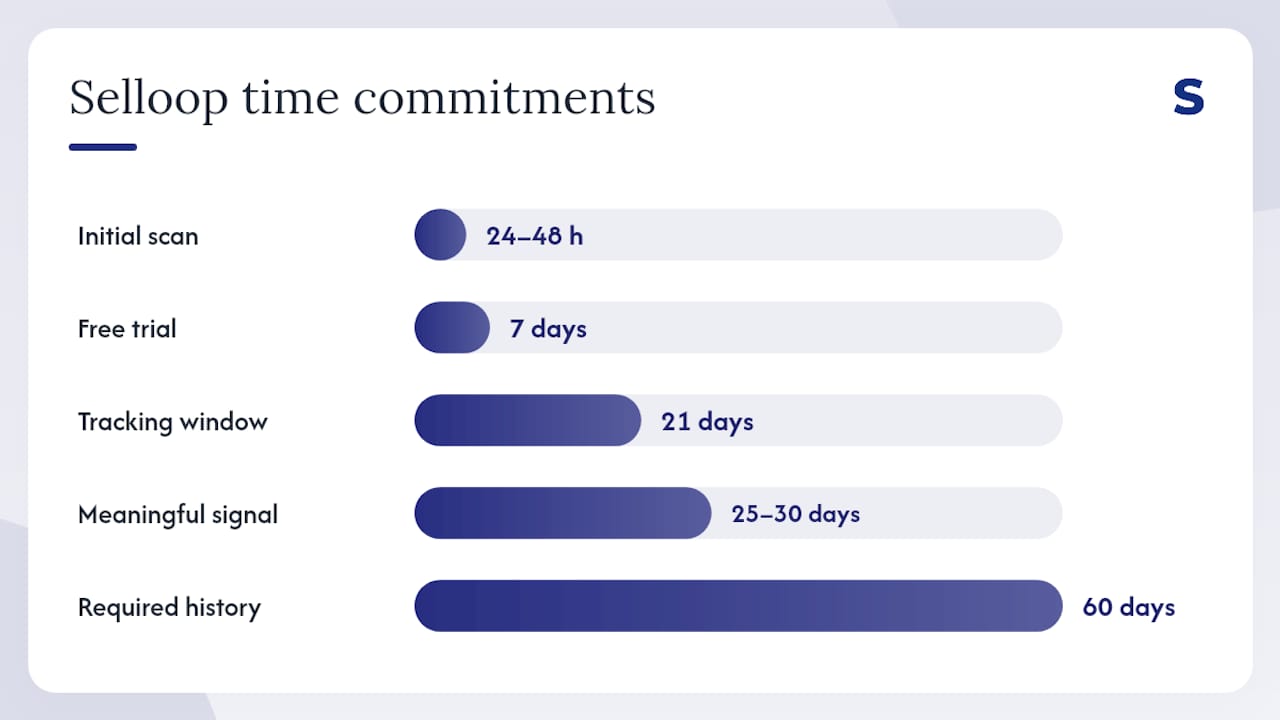
Implementation: Connect your Amazon Seller Central account, let Selloop analyze your campaigns (typically 24–48 hours for initial scan), review the first batch of recommendations, and approve the ones that match your goals. Expect meaningful signal from the 21-day tracking window by day 25–30.
Pro Tip: For your first pilot with Selloop, select 3–5 ASINs with at least 60 days of campaign history. That gives the AI enough data to generate high-confidence recommendations rather than exploratory suggestions.
Enterprise AI platforms (Pacvue, Teikametrics, Perpetua)
These platforms target brands and agencies running $50,000+ in monthly ad spend. They offer predictive ML bidding, DSP campaign management, AMC integration for cross-channel attribution, and dedicated customer success managers. Predictive AI strategies can outperform static approaches when historical data is deep enough, and at enterprise scale, that data depth is usually available.
Best for: Large brands, full-service agencies, sellers running DSP alongside Sponsored Ads.
Core approach: ML-driven bidding with managed service options. Most offer rule-based fallback layers alongside the ML engine.
Key features: Dayparting, bulk edits across hundreds of campaigns, AMC/DSP integration, A/B testing frameworks, custom reporting dashboards.
Pros: Deep integrations, agency-grade reporting, managed service options for hands-off operation.
Cons: High price floor, complex onboarding, overkill for sellers under $20K/month in ad spend.
Pricing: Typically $500–$2,000+/month or percentage of managed spend. Trial availability varies.
Self-serve rule-based tools (PPC Entourage, BidX, SellerMetrics, Prestozon, AiHello, Viral Launch Kinetic)
These tools let you build bid rules, automate basic harvesting, and schedule budget changes without writing code. They’re transparent by design because you write the logic yourself. The tradeoff is that you need to know what rules to write, and the tools won’t tell you when your rules are wrong.
Best for: Sellers who want to learn PPC mechanics hands-on, or those with very tight budgets who can’t justify a higher monthly fee.
Core approach: Deterministic rule-based automation. You define conditions; the tool executes them.
Key features: Bid rules, basic keyword harvesting, scheduled budget changes, some offer dayparting.
Pros: Low cost, full transparency, good for learning.
Cons: No AI-driven insight, no per-change outcome tracking in most cases, requires significant manual setup and ongoing rule maintenance.
Pricing: Freemium to ~$50–$150/month. Most offer free trials.
How the evaluation was done
Testing for this roundup combined a 21-day change-tracking pilot methodology with analysis of live account data across Sponsored Products and Sponsored Brands campaigns on the US marketplace. The primary KPIs measured were ACoS, TACoS, CPC, conversion rate on ad-driven traffic, spend redistribution across match types, and false positive negation rate (terms incorrectly flagged for negation).
The auto-to-phrase-to-exact waterfall recommended by practitioner guides served as the structural baseline: auto campaigns for discovery, phrase campaigns for validated terms after a minimum conversion threshold, exact match for proven winners with Top-of-Search bid multipliers. Tools were evaluated on how well their automation supports and accelerates this workflow rather than replacing it with a black box.
Testing constraints: the US marketplace was the primary focus. Live account variability means results differ by category, listing quality, and seasonal timing. Selloop’s own change-tracking data informed the SMB profile above; that relationship is disclosed. Sample sizes across rule-based tools were smaller, and results should be treated as directional rather than statistically definitive.
Why Selloop’s 21-day tracking window changes what you can trust
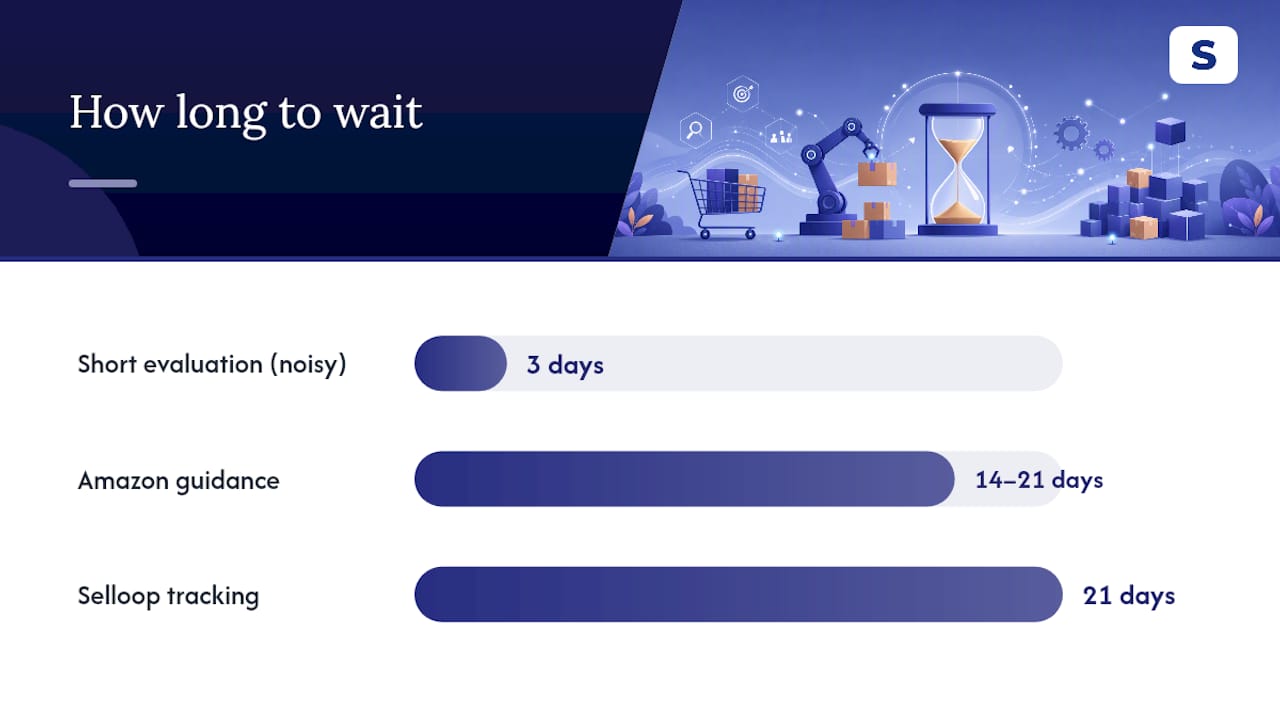
Most PPC tools tell you what to change. Selloop tells you whether the change worked. That distinction matters operationally: Amazon’s campaign recommendations require a 14–21 day window before their impact can be reliably assessed, and the same principle applies to any bid or keyword change. Evaluating a change after 3 days produces noise, not signal.
Here’s how a single bid change plays out inside Selloop’s tracking system. Selloop applies the change via the Amazon API and starts a 21-day observation window. The change worked. You now have evidence to apply the same logic to similar terms.
Without that tracking, you’d have to pull the data manually, align it to the change date, and hope you remembered which tool made which change and when.
Automated systems require a learning phase of at least 14–21 days. Making major changes before this window closes risks destabilizing performance and producing unreliable signals. The 21-day window is not a product feature — it reflects how Amazon’s own ad system stabilizes after a change.
How to run a 21-day pilot with Selloop:
- Select test ASINs. Pick 3–5 products with at least 60 days of campaign history and stable inventory. Avoid ASINs with pending listing changes or upcoming promotions that would distort results.
- Set the conservative profile. In Selloop, choose the conservative optimization mode. This limits the size of bid changes and the frequency of keyword actions during the learning window.
- Define your control baseline. Record current ACoS, TACoS, and CPC for each test ASIN before enabling recommendations. Screenshot or export the 30-day average.
- Approve the first recommendation batch. Review Selloop’s initial recommendations, check the data justification for each, and approve the ones that align with your target ACoS. Skip any that touch ASINs outside your test set.
- Measure on day 21. Compare ACoS, TACoS, and CPC against your baseline. Check the change log to confirm which recommendations were applied and what the tracked outcome shows.
Which ad types and marketplaces does automation cover?
Sponsored Products are the foundation of most automation workflows. They’re cost-per-click ads that support both automatic and manual targeting, dynamic bidding (up and down, down only, or fixed), and placement bid adjustments for Top-of-Search and Product Detail Pages. Every serious automation tool supports Sponsored Products as its primary campaign type.
Sponsored Brands ads (formerly Headline Search Ads) support keyword targeting and custom creative, including video. Automation tools vary in how deeply they manage Sponsored Brands: most handle bid adjustments and keyword harvesting, but creative rotation and landing page testing typically require manual input. Selloop covers Sponsored Brands alongside Sponsored Products.
Sponsored Display ads use audience and product targeting rather than keyword targeting, which means the automation logic is different. Bid adjustments are based on audience signals rather than search term performance. Enterprise platforms with AMC access can layer first-party audience data onto Sponsored Display; SMB tools generally offer limited Sponsored Display automation.
All tools in this roundup are available and functional on the US Amazon marketplace. Enterprise platforms with DSP access extend automation to display inventory beyond Amazon’s owned properties. AMC integration, which enables cross-channel attribution and custom audience building, requires eligibility and is not available on standard Seller Central accounts without DSP access.
How does customer support compare across tool categories?
Support quality follows pricing almost exactly. Enterprise platforms assign dedicated customer success managers, offer onboarding calls, and often include managed service tiers where their team runs campaigns on your behalf. That level of service is priced accordingly.
Self-serve rule-based tools rely on documentation, video tutorials, and community forums. Response times for support tickets vary widely, and live chat is rare at the lower price tiers. If you’re comfortable troubleshooting independently, this is workable. If you’re migrating a complex account, it’s a real friction point.
Selloop sits between those extremes. Onboarding is self-serve, with documentation and direct support available to paying subscribers. For sellers who are new to AI-driven recommendations, the data justification built into every recommendation reduces the need for hand-holding: you can see why the tool is suggesting a change without needing to ask a support agent.
What should you know about security and data privacy?
Any PPC automation tool you connect to your Amazon account receives read and write access via the Amazon Advertising API. That access is scoped to your advertising data, not your financial or customer data, but it’s still a meaningful permission to grant.
Before connecting any tool, confirm it uses OAuth-based API authentication (the standard Amazon requires), stores credentials encrypted at rest, and does not share your campaign data with third parties for training or benchmarking without explicit consent. Ask whether the tool is SOC 2 compliant or equivalent, particularly if you’re an agency managing client accounts.
For enterprise platforms with AMC access, data governance is more complex. AMC processes first-party signals in a clean room environment, and the outputs are aggregated, not individual-level. Still, confirm with the vendor how long raw query results are retained and who has access to them internally.
Selloop connects via the Amazon Advertising API using standard OAuth. Campaign data is used to generate recommendations for your account only. For specific data retention and privacy policy details, review Selloop’s published privacy documentation before connecting.
Real-world results: what the evidence shows
Published seller accounts consistently point to two outcomes from well-implemented automation: reduced wasted spend on non-converting search terms, and faster keyword promotion from auto campaigns to exact match. The auto-to-phrase-to-exact waterfall is the mechanism: run auto campaigns for discovery, harvest terms after a minimum of 3 conversions, promote to phrase, then to exact match with Top-of-Search multipliers only on proven converters.
Sellers who implement this workflow manually report spending 4–8 hours per week on search term analysis and bid adjustments for a mid-size catalog. Automation tools compress that to a review queue: approve or reject recommendations in 15–20 minutes, let the tool apply and track the changes, and return in 21 days to evaluate outcomes.
The specific performance gains depend heavily on the starting state of the account. Accounts with high wasted spend on irrelevant auto-campaign terms see the fastest improvement. Accounts that are already well-optimized see smaller gains from automation but benefit from the time savings and the safety net of change-tracking.
What early adopters should expect when adopting automation
The sellers who get the most out of automation tools are the ones who treat the first 30 days as a calibration period, not a performance period. Start with the most conservative profile available. Run your test on a small, non-overlapping set of ASINs so you’re not contaminating your control data. Watch TACoS, not just ACoS, because ACoS can improve while TACoS worsens if automation is suppressing organic-rank-supporting spend.
One operational pitfall that catches sellers off guard: automation tools don’t know your inventory situation. If you approve a bid increase on a term that’s converting well but you’re 10 days from a stockout, you’ll spend money driving traffic to a listing that’s about to go unavailable. Check inventory alignment before approving any scale-up recommendation.
The practical advice is simple: start small, measure the right metrics, and give the tool the 21-day window it needs to show you real signal. Sellers who try automation for 72 hours and declare it ineffective are evaluating noise. Those who run a disciplined pilot with defined KPIs and a proper learning window almost always find at least one meaningful improvement worth scaling.
Selloop’s 7-day free trial: what you get and how to start
Sellers who want measurable PPC improvement without agency fees or complex rule-building have a clear starting point: Selloop. It’s built specifically for the seller who manages their own campaigns, wants to know exactly why a change is being recommended, and needs to see whether it worked before committing to scale.
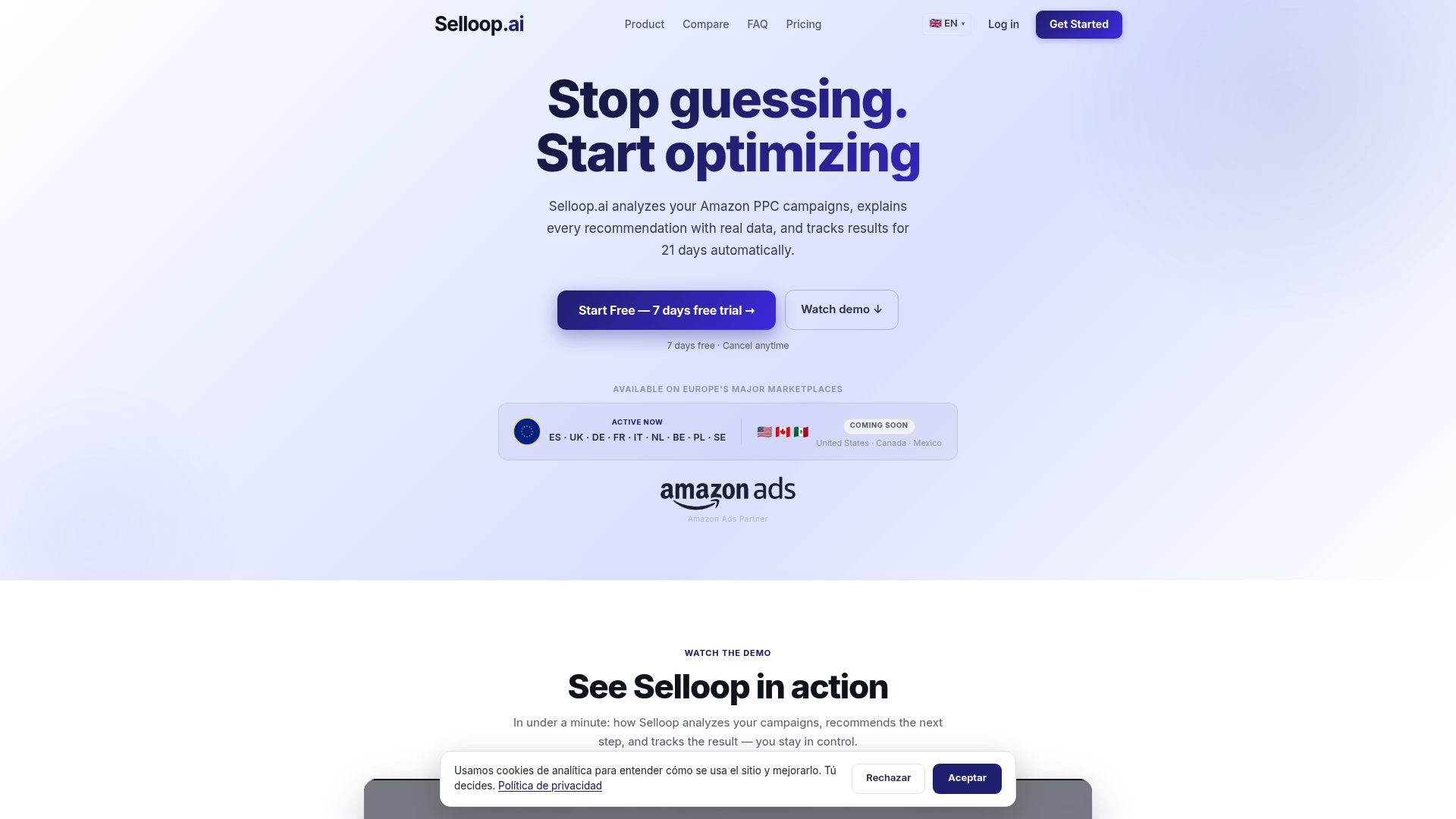
The trial includes full access to Selloop’s core features: AI-driven campaign analysis, automated keyword harvesting and negative keyword suggestions, campaign health scoring, and the 21-day change-tracking window. Optimization profiles (conservative, balanced, and aggressive) are available from day one, so you can calibrate how aggressively the tool acts during your trial period. Plans start at €29/month after the 7-day free trial, with tiers based on managed ad spend and number of accounts. Paying subscribers get direct support and onboarding guidance.
Start your free 7-day trial today and have your first batch of data-justified recommendations ready to review within 48 hours of connecting your account.
Sources
- Best practices for campaign recommendations | Amazon Ads
- Amazon PPC Strategy Guide 2026: How to Launch, Optimize & Scale Without Burning Cash